
Skip to the content
  • English
    • Français
    • Português
    • Español
    • Deutsch
  • English
    • Français
    • Português
    • Español
    • Deutsch

Getting started

  • Login
  • Personal informations
  • General Features
  • Lexicon

Vehicles & users

  • Attach a vehicle to a groupe
  • Create/edit/delete a vehicle
  • List of vehicles
  • Assign a vehicle to a driver
  • User accounts
  • User management
  • User rights
  • Create/ Edit/ Delete

Dashboard

  • Global data
  • Fillings
  • Classification of vehicles
  • Use of vehicles
  • Average consumption
  • Events and Notifications

Consumptions and reports

  • Real-time analysis
  • Daily/weekly analysis
  • TCA – Analysis
  • Download a report
  • Define a consumption target
  • Fuel price setting

Fill management

  • Tank filling procedure
  • Detection of internal diversions
  • Fuel ticket encoding
  • Fill management

Installation and maintenance

  • Battery replacement procedure
  • Using maintenance mode
  • Activation/deactivation
  • Installation

User management

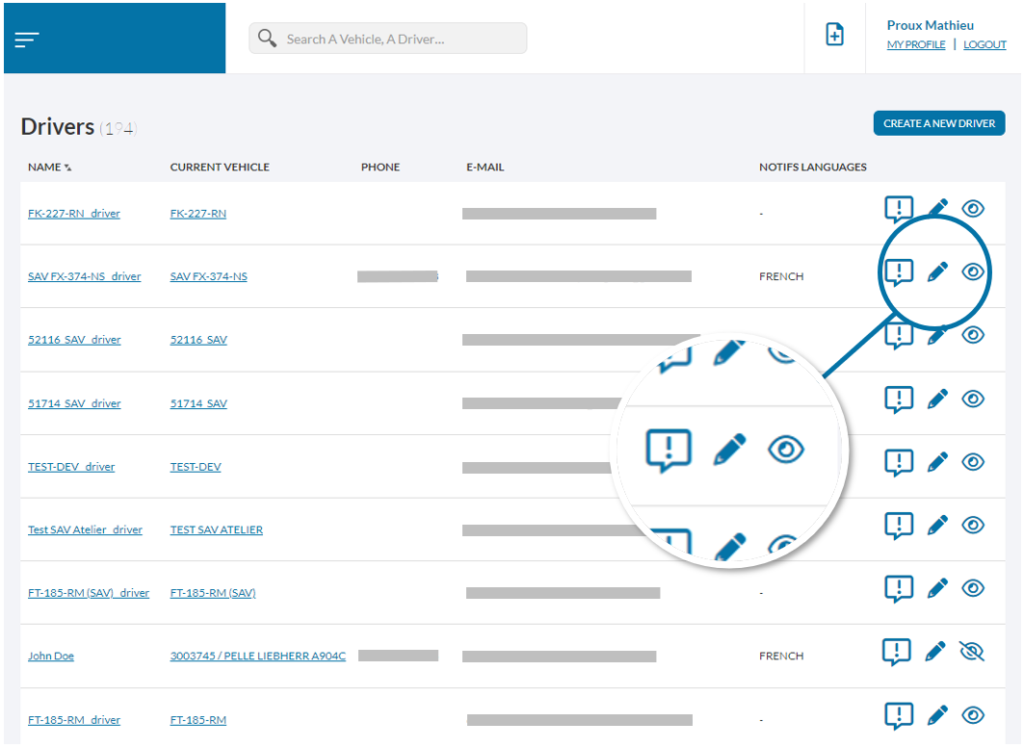
From the list of users and depending on your rights, it is possible to:

  • Access their user information by clicking on their name
  • – Set up and manage the latter’s notifications
  • – Edit personal information
  • – Deactivate his account; he will no longer have access to the platform and will no longer receive any notifications.
    A simple click on the same icon will instantly reactivate his account
Was this article useful?
Updated on 24 May 2022
User accountsUser rights

Powered by BetterDocs

© 2026

Powered by WordPress

To the top ↑ Up ↑