
Skip to the content
  • English
    • Français
    • Português
    • Español
    • Deutsch
  • English
    • Français
    • Português
    • Español
    • Deutsch

Getting started

  • Login
  • Personal informations
  • General Features
  • Lexicon

Vehicles & users

  • Attach a vehicle to a groupe
  • Create/edit/delete a vehicle
  • List of vehicles
  • Assign a vehicle to a driver
  • User accounts
  • User management
  • User rights
  • Create/ Edit/ Delete

Dashboard

  • Global data
  • Fillings
  • Classification of vehicles
  • Use of vehicles
  • Average consumption
  • Events and Notifications

Consumptions and reports

  • Real-time analysis
  • Daily/weekly analysis
  • TCA – Analysis
  • Download a report
  • Define a consumption target
  • Fuel price setting

Fill management

  • Tank filling procedure
  • Detection of internal diversions
  • Fuel ticket encoding
  • Fill management

Installation and maintenance

  • Battery replacement procedure
  • Using maintenance mode
  • Activation/deactivation
  • Installation

Use of vehicles

Table of contents
  • Usage time
  • Consumption time when stopped

Usage time

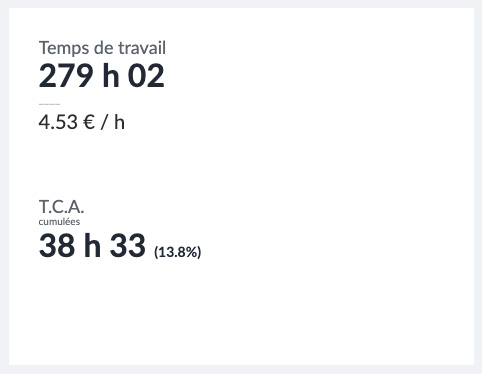
Thanks to the sensors and our algorithms, the KEEPER detects and records the times of use of the machines/vehicles which correspond to the engine ignitions. The accumulation of the fleet is presented on the dashboard.

Consumption time when stopped

In addition to engine ignition, the devices allow calculation of engine on/vehicle stationary times.
After 3 min of detection of an engine on with the vehicle stationary, the counter is activated (with start at 3 min). Each TCA is recorded along with the GPS position and can be analyzed from the vehicle statistics page.
Was this article useful?
Updated on 7 July 2023
Classification of vehiclesAverage consumption

Powered by BetterDocs

Table of contents
  • Usage time
  • Consumption time when stopped

© 2026

Powered by WordPress

To the top ↑ Up ↑