
Skip to the content
  • English
    • Français
    • Português
    • Español
    • Deutsch
  • English
    • Français
    • Português
    • Español
    • Deutsch

Getting started

  • Login
  • Personal informations
  • General Features
  • Lexicon

Vehicles & users

  • Attach a vehicle to a groupe
  • Create/edit/delete a vehicle
  • List of vehicles
  • Assign a vehicle to a driver
  • User accounts
  • User management
  • User rights
  • Create/ Edit/ Delete

Dashboard

  • Global data
  • Fillings
  • Classification of vehicles
  • Use of vehicles
  • Average consumption
  • Events and Notifications

Consumptions and reports

  • Real-time analysis
  • Daily/weekly analysis
  • TCA – Analysis
  • Download a report
  • Define a consumption target
  • Fuel price setting

Fill management

  • Tank filling procedure
  • Detection of internal diversions
  • Fuel ticket encoding
  • Fill management

Installation and maintenance

  • Battery replacement procedure
  • Using maintenance mode
  • Activation/deactivation
  • Installation

Attach a vehicle to a groupe

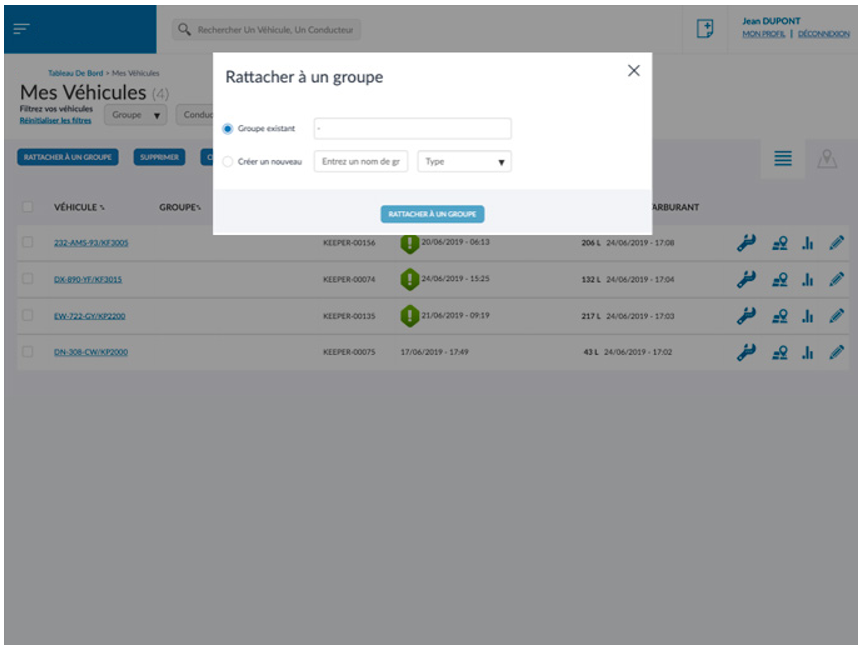
In order to use filters for the consumption displays, the map or even the lists, it is possible to create groups and integrate certain vehicles into these groups.
To attach a vehicle to a group, two solutions are possible:

  • Select the checkbox to the left of the vehicle name, then click the button[Rattacher à un groupe] at the top of the page, a window opens with the existing groups or the creation of a new one.
  • Access to this window is also possible directly in the edition of vehicle information.
Was this article useful?
Updated on 18 May 2022
Create/edit/delete a vehicle

Powered by BetterDocs

© 2026

Powered by WordPress

To the top ↑ Up ↑